The service control panel is available at https://egodfather.app/app/.
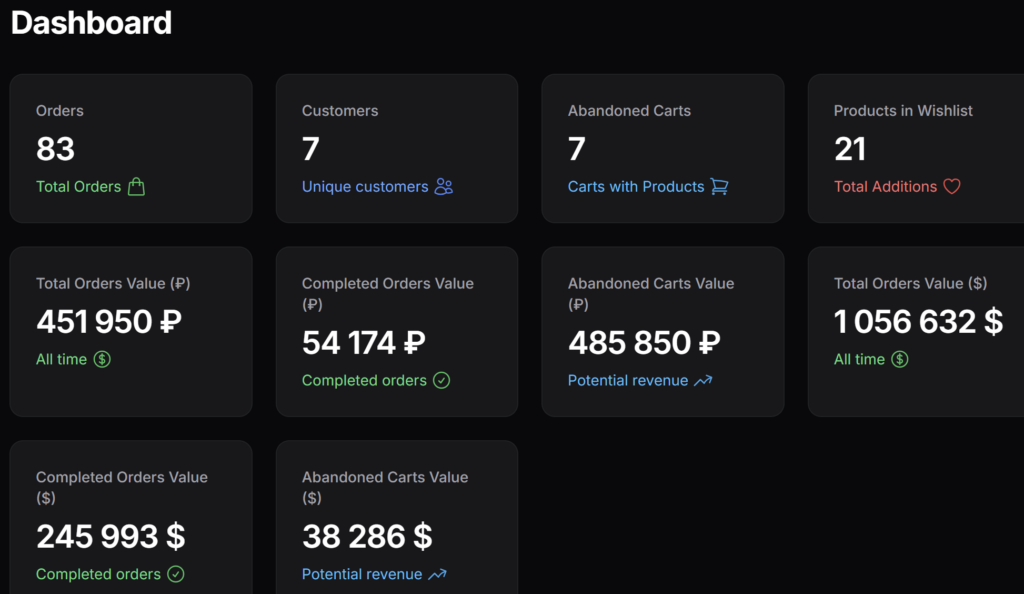
Dashboard: The panel’s main page displays summary statistics: the number of orders, the number of unique customers, unpaid carts, and additions to favorites. The “Amount in carts” and “Items in favorites” widgets are the most important for sales analysis. For Pro plan users, access to customer contact details is available in these sections.
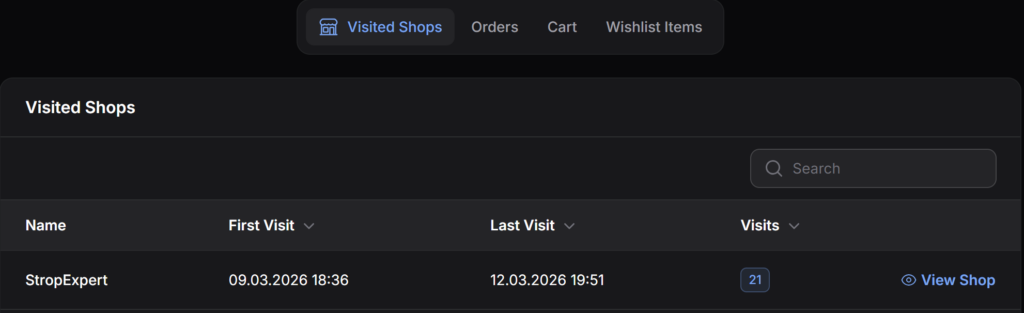
Customers: The section contains a list of all users with labels (badges) for the stores where they have been active. There are 4 tabs available in each customer’s card:
- Visited stores: displays the dates of the first and last visits, as well as the total number of visits.
- Orders: contains the customer’s full purchase history, order statuses, product lists, and prices.
- Cart: shows the current contents of the user’s unpaid cart and the total amount.
- Favorite products: a list of products added by the user to their saved items.
Abandoned Carts and Favorites: A general list of all unpaid carts across all connected stores is available in the panel. Data updates automatically every 5 minutes, but it can be forced to update using the “Sync All” button. In the “Favorites” section, a list of the most popular saved items is generated, broken down into the Top 3 and other positions.